Working With Text Data
Motivation
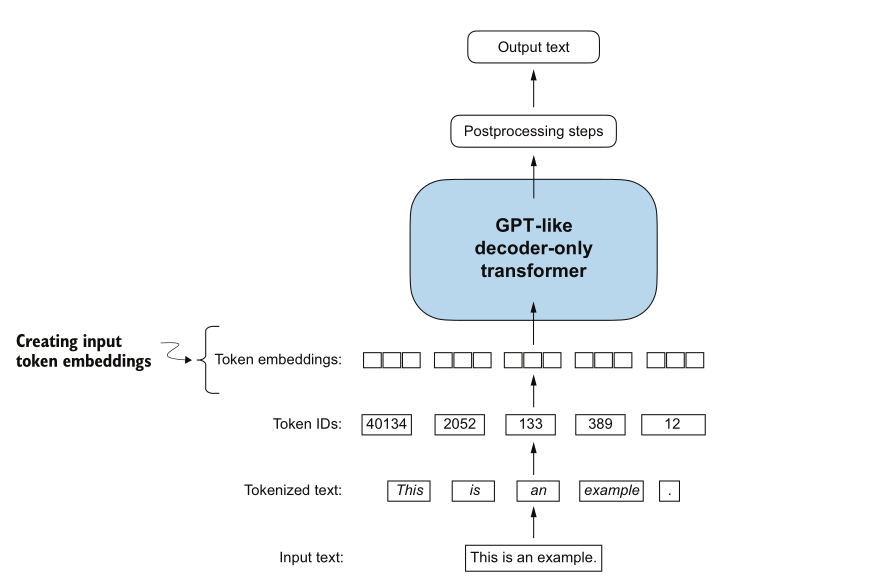
This is the second blog in the series where I read Build a Large Language Model (From Scratch) by Sebastian Raschka and write down what I learn along the way. In the first blog we looked at the architecture behind LLMs. Here we go one level lower and answer a very practical question: how does plain text become something a neural network can train on?
Text is categorical, and categorical data is not compatible with the mathematical operations used to implement and train neural networks. So categorical entities (like text, audio, and video) are converted into a vector format. This phenomenon is often referred to as embedding.
In this blog we are focusing on token embeddings, since later in the book we will be training GPT-like LLMs, which learn to generate one token at a time. A token may be a whole word, part of a word, punctuation, or another text fragment chosen by the tokenizer.
The companion code for everything below lives in my llm-from-scratch repo, under experiments/chapter-2/. I will quote the outputs as we go.
Table of Contents
- Why text becomes numbers
- Tokenizing text
- Converting tokens into token IDs
- Adding special context tokens
- Byte pair encoding
- Data sampling with a sliding window
- Creating token embeddings
- Encoding word positions
- Summary
Why text becomes numbers
Embedding size, also referred to as the dimensionality of the model’s hidden states, varies based on the specific model variant and size.
Models like GPT-2 (117M and 125M parameters) use an embedding size of 768 dimensions, meaning each word is converted into a vector of 768 dimensions. Different models have different embedding sizes, depending upon the tradeoff chosen between performance and efficiency.
That is hard to picture, so here we use a 2D vector instead, because high-dimensional space cannot be visualised directly.
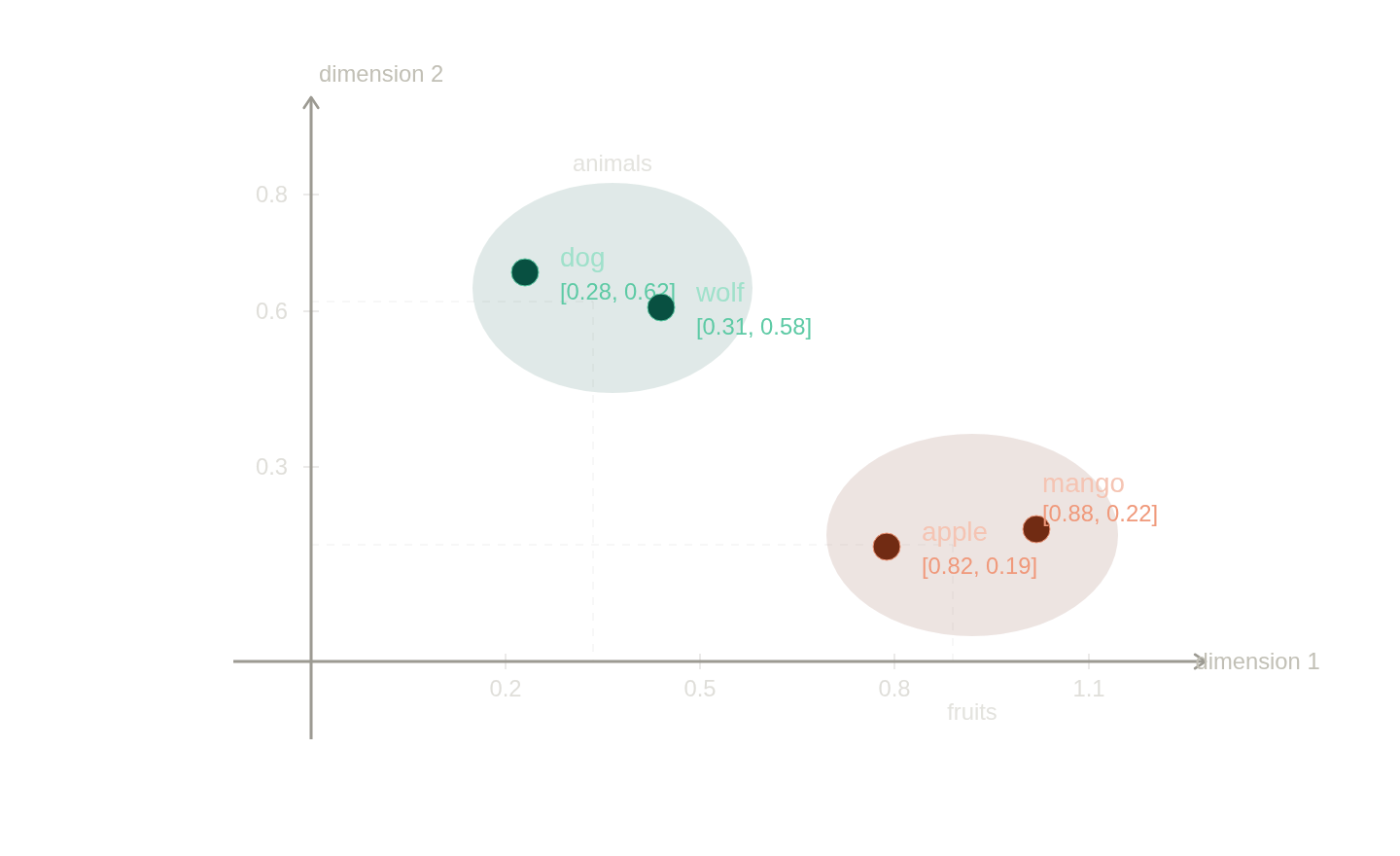
We can understand here how animals and fruits are clustered differently, and similar words lie close. This goes into a different scope when we work with high dimensions, but the intuition carries over: the geometry of the space encodes meaning.
Tokenizing text
Tokenizing text means converting it into individual units called tokens. For example, “My Name is Pragalva” would be tokenized into “My”, “Name”, “is”, “Pragalva”. Whether whitespace is also kept as a token depends on the use case.
In the code I start with a regular expression that splits on punctuation and whitespace, and then drop the empty fragments.
import re

text = "Hello, world this is a test, or is it ?"
result = re.split(r'([,.:;?_!"()\']|--|\s)', text)
result = [item for item in result if item.strip()]
print(result)
['Hello', ',', 'world', 'this', 'is', 'a', 'test', ',', 'or', 'is', 'it', '?']
Notice that the comma and the question mark survive as their own tokens. That is deliberate. Punctuation carries meaning, and keeping it separate from the words lets the model treat “test” and “test,” as the same word. Whether to keep the whitespace itself is the part that depends on the application. Here removing it keeps things clean, so I strip it out.
Running the same split over the full short story the-verdict.txt gives 4690 tokens. That is the raw material we now turn into numbers.
Converting tokens into token IDs
The next step is to convert the tokens into token IDs, before converting them into embedded vectors. To do that, we first need to build a vocabulary.
The vocabulary is like a dictionary here, a mapping of tokens to their unique IDs.
We take the unique tokens from the previous step, remove duplicates, sort them in alphabetical order, and assign each one a distinct integer. For the-verdict.txt that leaves 1130 unique tokens, so 1130 IDs.
all_words = sorted(set(preprocessed))
vocab = {token: integer for integer, token in enumerate(all_words)}
To turn the model’s output back from numbers into text, we create an inverse version of the vocabulary that maps the token IDs back to the corresponding text tokens. That gives us a tokenizer with two halves: encode (text to IDs) and decode (IDs back to text).
class SimpleTokenizerV1:
    def __init__(self, vocab):
        self.str_to_int = vocab
        self.int_to_str = {i: s for s, i in vocab.items()}

    def encode(self, text):
        preprocessed = re.split(r'([,.?_!"()\']|--|\s)', text)
        preprocessed = [item.strip() for item in preprocessed if item.strip()]
        return [self.str_to_int[s] for s in preprocessed]

    def decode(self, ids):
        text = " ".join([self.int_to_str[i] for i in ids])
        return re.sub(r'\s+([,.?!"()\'])', r'\1', text)
Encoding a line from the story and decoding it straight back shows the round trip working:
encode: [1, 56, 2, 850, 988, 602, 533, 746, 5, 1126, 596, 5, 1, 67, 7, 38, 851, 1108, 754, 793, 7]
decode: "It's the last he painted, you know," Mrs. Gisburn said with pardonable pride.
The re.sub in decode is what cleans up the spacing, pulling punctuation back against the word it belongs to so we do not get know , with a stray space.
Adding special context tokens
If you hand the tokenizer we just built an unknown word, it errors out. The tokenizer was not built to handle words outside its vocabulary, so the lookup simply fails.
We can fix this by extending the vocabulary with special tokens. An <|unk|> token stands in for any word the tokenizer has never seen, and an <|endoftext|> token marks a boundary between unrelated pieces of text, even when they are concatenated together.
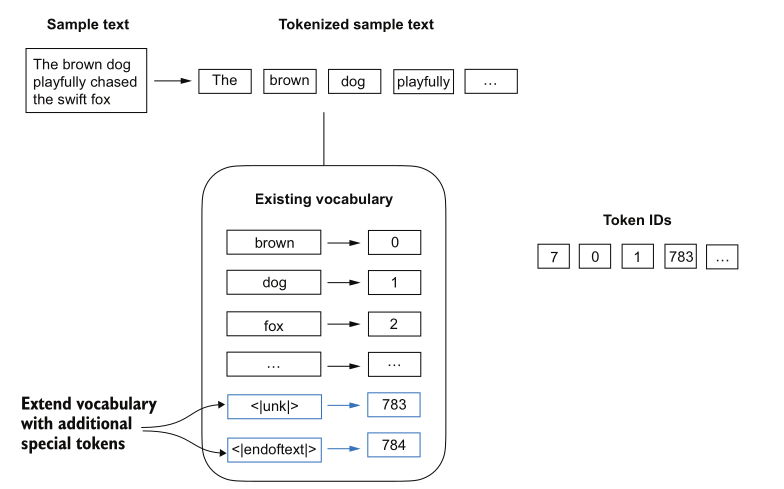
<|unk|>, and <|endoftext|> separates documents that have been stitched together.In the updated tokenizer, the encode step now checks whether each token is in the vocabulary, and substitutes <|unk|> when it is not.
preprocessed = [item if item in self.str_to_int else "<|unk|>" for item in preprocessed]
The <|endoftext|> token earns its place when you train on many independent documents. Joining two unrelated passages with it tells the model where one stops and the next begins, so it does not try to carry context across a boundary that has no real continuity.
Byte pair encoding
The simple tokenizer works, but replacing every unseen word with <|unk|> throws away information. Byte pair encoding (BPE) is the scheme that solves this, and it is the one used to train LLMs such as GPT-2, GPT-3, and the original model behind ChatGPT.
I use the tiktoken library for the GPT-2 BPE tokenizer instead of hand-rolling one.
import tiktoken
tokenizer = tiktoken.get_encoding("gpt2")
Running it, the <|endoftext|> token is assigned the ID 50256. The full vocabulary of the original model has 50257 tokens, and <|endoftext|> is the largest token ID, the very last slot.
The interesting part is that the BPE tokenizer does not use an <|unk|> token at all, yet it can still encode and decode a word it has never seen, like someunknownPlace, correctly. It does this by breaking the unknown word down into smaller subword tokens.
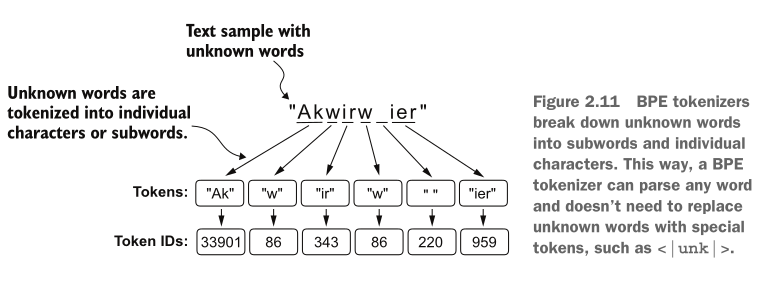
To see this on a word that is definitely not in any training set, I encoded my own made-up string:
tokenizer.encode("PragalvaExperimentsAsUsual")
[6836, 363, 282, 6862, 20468, 6800, 1722, 5842, 723]
pieces: ['Pr', 'ag', 'al', 'va', 'Exper', 'iments', 'As', 'Us', 'ual']
Nine tokens, and not one of them is “unknown”. The tokenizer splits the string into familiar fragments like Pr, ag, Exper, and iments. GPT-2 uses byte-level BPE, so when a larger learned token is unavailable, the text can ultimately be represented through tokens derived from its underlying bytes. This is what lets the tokenizer, and therefore the LLM trained with it, process text containing words that were never present in its training data.
So how does BPE decide on these pieces? GPT-2’s tokenizer begins with a representation that covers every possible byte value, mapped into a form BPE can process. It then repeatedly looks at the training corpus, finds frequently occurring adjacent token pairs, and merges those pairs into new tokens. Common sequences can therefore become single vocabulary entries, while rare text remains split into smaller units. It records the merges and repeats until it reaches the target vocabulary size.
Data sampling with a sliding window
Now that text can become token IDs, we need to shape it into training examples. An LLM learns by predicting the next token, so every example needs an input and a target.
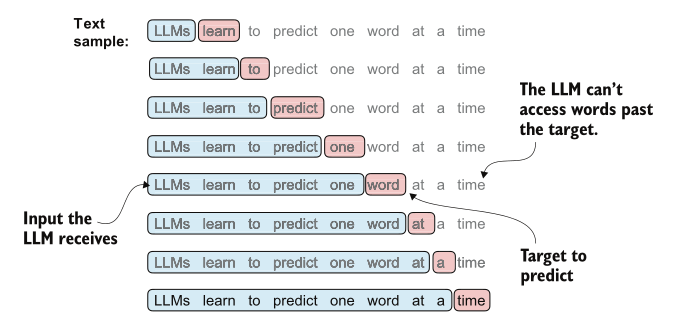
The input is what the LLM gets, and the target is what the LLM needs to predict. The sliding-window dataset creates the input and target sequences by shifting the targets one token to the right. It does not hide future tokens by itself. That happens inside the model, where a causal attention mask prevents each position from attending to positions that come after it.
The easiest way to create an input-target pair is to make two variables: x is the input, and y is just x shifted by one (the next token).
enc_sample = enc_text[50:]
context_size = 4
x = enc_sample[:context_size]
y = enc_sample[1:context_size + 1]
x: [290, 4920, 2241, 287]
y: [4920, 2241, 287, 257]
Sliding the prediction one step at a time over those four tokens shows the next-token task the model is actually trained on:
[290]                    ----> 4920
[290, 4920]              ----> 2241
[290, 4920, 2241]        ----> 287
[290, 4920, 2241, 287]   ----> 257
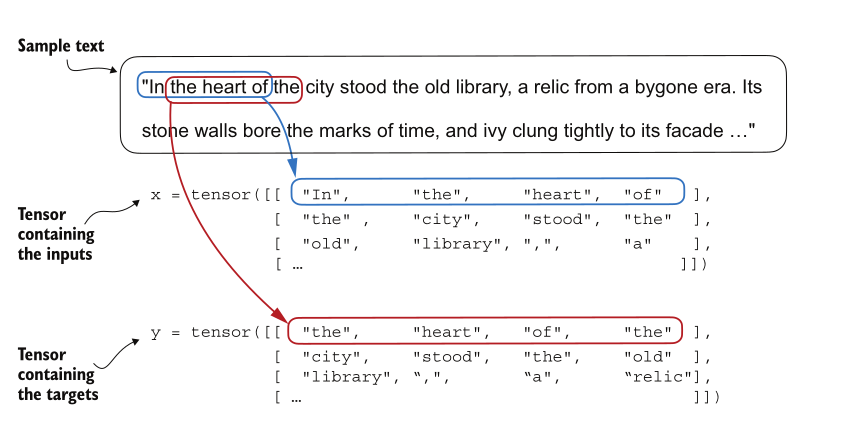
x holds the inputs, y holds the targets, and y is x slid one token to the right.We created tokens and token IDs, and now we use PyTorch’s standard library to convert them into tensors. Think of tensors like high-dimensional vectors, which we touched on in the first blog.
To produce many of these examples efficiently, the code wraps the logic in a PyTorch Dataset, sliding a fixed window across the token stream.
class GPTDatasetV1(Dataset):
    def __init__(self, txt, tokenizer, max_length, stride):
        self.input_ids = []
        self.target_ids = []
        token_ids = tokenizer.encode(txt)
        for i in range(0, len(token_ids) - max_length, stride):
            input_chunk = token_ids[i:i + max_length]
            target_chunk = token_ids[i + 1:i + max_length + 1]
            self.input_ids.append(torch.tensor(input_chunk))
            self.target_ids.append(torch.tensor(target_chunk))
Two parameters control that window, and they are worth pinning down.
max_length is the context length. It answers how many token IDs the model reads in one row. In the illustration below we use a slice of width 4 and 8, but in practice max_length is usually 256 or more.
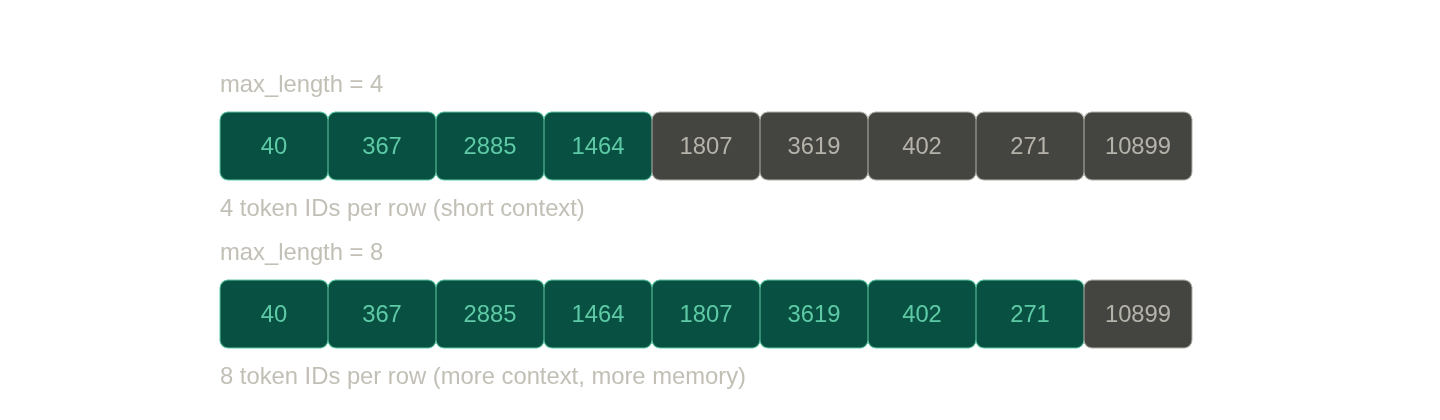
max_length is how many token IDs sit in one row. A larger window gives the model more context to read at once, at the cost of more memory.stride is how far the window jumps to produce the next slice. When the stride is smaller, tokens appear in many examples, which can lead to overfitting because the model keeps seeing the same tokens over and over. A larger stride spreads the windows out and reduces that overlap.
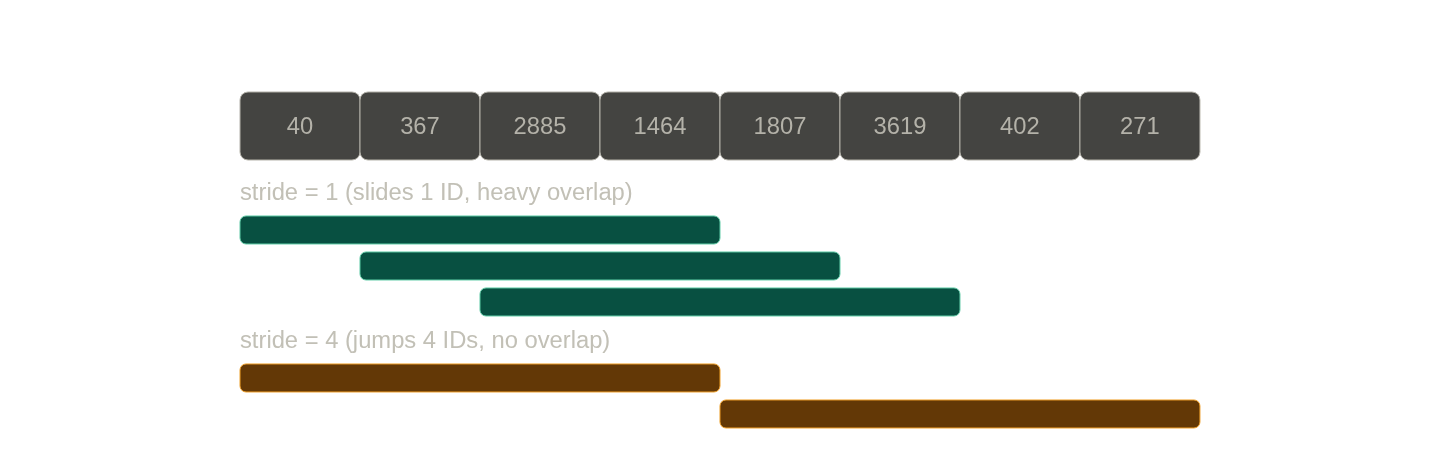
stride sets how far the window moves each step. A small stride means heavy overlap between examples. A stride equal to max_length means no overlap.Putting both together, each window produces one input row and one target row, where the input is the row the model gets and the target is what it is trained to predict.
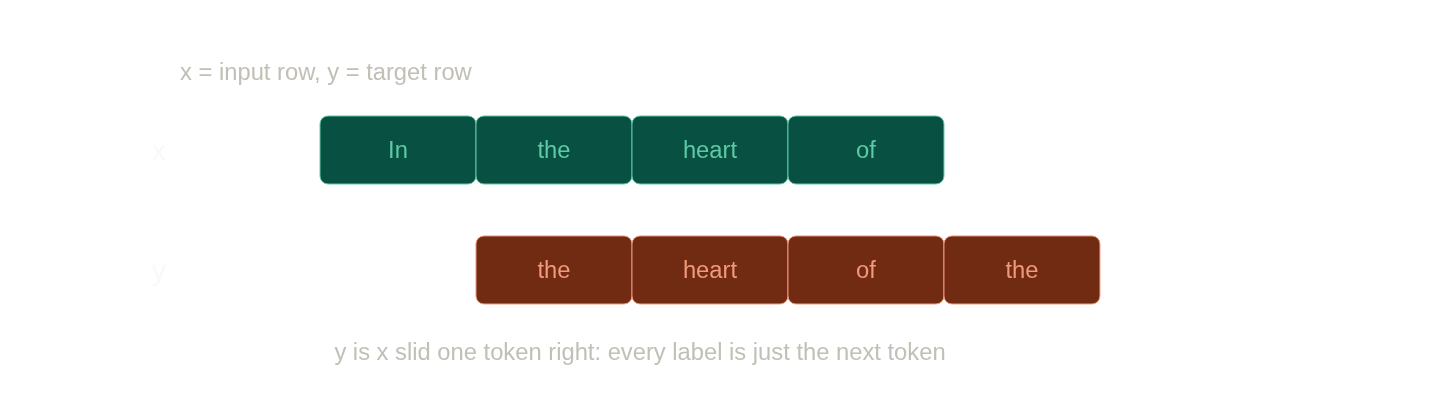
x is what the model reads. The target row y is the same window slid one token right, so every label is just the next token.This is the quiet reason pre-training scales so well. A human never needs to label any of this data. The supervision signal is derived from the data stream itself, since the “answer” for any window is simply the token that comes next.
The last piece is the batch. Once we have (input, target) slices, batch_size is just a stack of them, and it determines how tall the stack is.
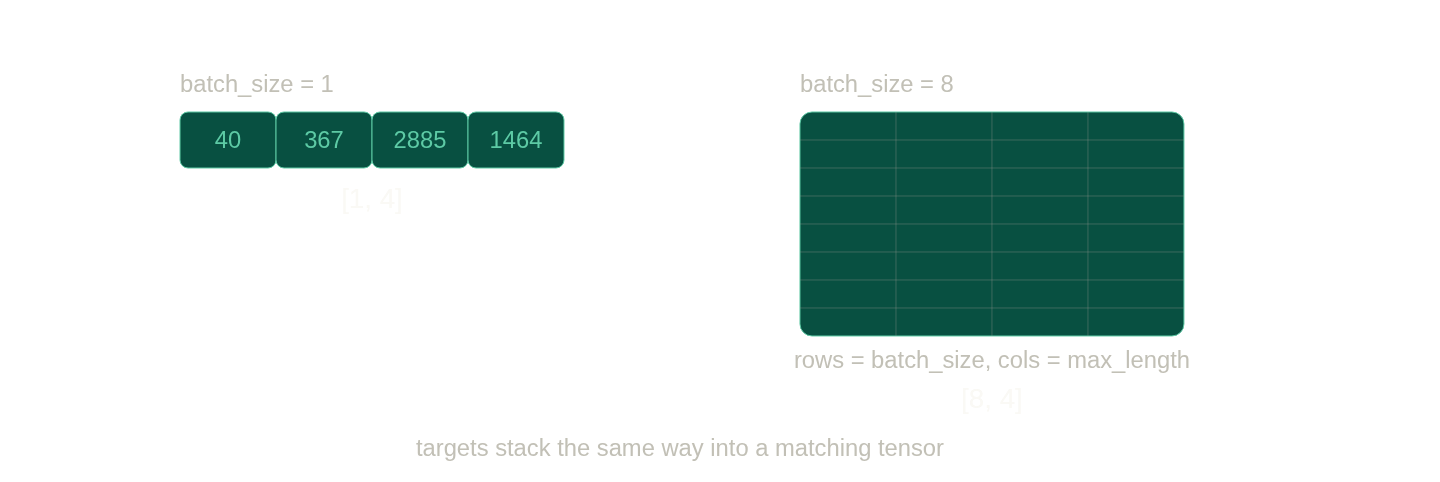
batch_size is the number of rows, max_length is the width. Targets stack into a matching tensor.Wrapping the dataset in a DataLoader and pulling the first two batches with batch_size=1, max_length=4, and stride=1 shows the window advancing by a single token between batches:
first batch:  [tensor([[  40,  367, 2885, 1464]]), tensor([[ 367, 2885, 1464, 1807]])]
second batch: [tensor([[ 367, 2885, 1464, 1807]]), tensor([[2885, 1464, 1807, 3619]])]
With batch_size=1 the shape is torch.Size([1, 4]). The first value, 1, is the number of rows in the batch, and the second value, 4, is the max_length. Bump the batch size up and the first number grows with it.
Creating token embeddings
We now have batches of token IDs. The final step before they reach the model is turning each ID into a vector, which is the embedding we set out to build.
An embedding lives inside a weight matrix. In neural networks, weights are the numbers the network learns during training. They are initialized as random numbers in the beginning, so that the model does not behave the same everywhere, and they are then adjusted through backpropagation until the model is good at its task.
Two names from the code are worth clarifying, because they are easy to mix up:
input_idsare the token IDs in the current window. Their count is themax_length.vocab_sizeis the size of the entire vocabulary the LLM knows.
So why does the code below set vocab_size to 6 while there are only 4 input_ids? Imagine a dictionary. It holds many words, but you only use a handful of them in any one sentence. In the same way, the input_ids are like your sentence, and the vocabulary is the whole dictionary.
input_ids = torch.tensor([2, 3, 5, 1])
vocab_size = 6
output_dim = 3
torch.manual_seed(123)
embedding_layer = torch.nn.Embedding(vocab_size, output_dim)
This creates a 6 by 3 weight matrix, one row per vocabulary entry, each row a 3-dimensional vector:
tensor([[ 0.3374, -0.1778, -0.1690],
        [ 0.9178,  1.5810,  1.3010],
        [ 1.2753, -0.2010, -0.1606],
        [-0.4015,  0.9666, -1.1481],
        [-1.1589,  0.3255, -0.6315],
        [-2.8400, -0.7849, -1.4096]], requires_grad=True)
An embedding vector, in simple words, is a lookup. It retrieves a row from the embedding layer’s weight matrix using a token ID. Asking for token ID 3 returns the fourth row (counting from zero):
embedding_layer(torch.tensor([3]))
tensor([[-0.4015, 0.9666, -1.1481]], grad_fn=<EmbeddingBackward0>)
That is exactly row index 3 of the matrix above. Pass a whole list of IDs and you get one row stacked per ID. There is no multiplication happening here, just a row lookup, which is what makes embedding layers so fast.
Encoding word positions
There is one limitation in what we have so far. Token embeddings do not account for position. Regardless of where a token sits in the sequence, the same token ID always points to the same vector. The word “the” as the first token and the word “the” as the tenth token would be identical to the model, which throws away the order of the sentence.
To address this, we use positional embeddings, which are added to the token embeddings. The result is the input embedding that the model finally reads.
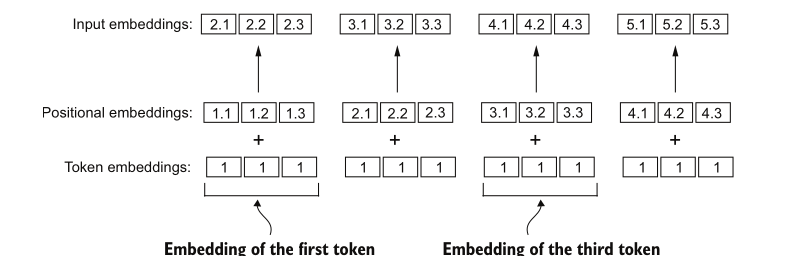
In this way the model not only learns the words but can also learn the relationship between the order of tokens. In an LLM like the ones from OpenAI, these positional embeddings are not pre-defined. They are optimized during the training process, just like the token embeddings.
In code, the positional embedding layer is indexed by position rather than by token ID, so we feed it the sequence of positions 0, 1, 2, ... max_length - 1:
token_embedding_layer = torch.nn.Embedding(vocab_size, output_dim)   # vocab_size = 50257, output_dim = 256
pos_embedding_layer = torch.nn.Embedding(context_length, output_dim)  # context_length = max_length = 4

token_embeddings = token_embedding_layer(inputs)
pos_embeddings = pos_embedding_layer(torch.arange(context_length))
input_embeddings = token_embeddings + pos_embeddings
Running it over a real batch of 8 rows with max_length=4 and an embedding size of 256, the shapes line up like this:
Token IDs shape:        torch.Size([8, 4])
Token embeddings shape: torch.Size([8, 4, 256])
Pos embeddings shape:   torch.Size([4, 256])
Input embeddings shape: torch.Size([8, 4, 256])
The positional embeddings have shape [4, 256], one 256-dimensional vector per position, and PyTorch broadcasts them across all 8 rows of the batch when we add. The final input embeddings come out as [8, 4, 256]: 8 sequences, 4 tokens each, every token now a 256-dimensional vector that carries both its meaning and its position.
Summary
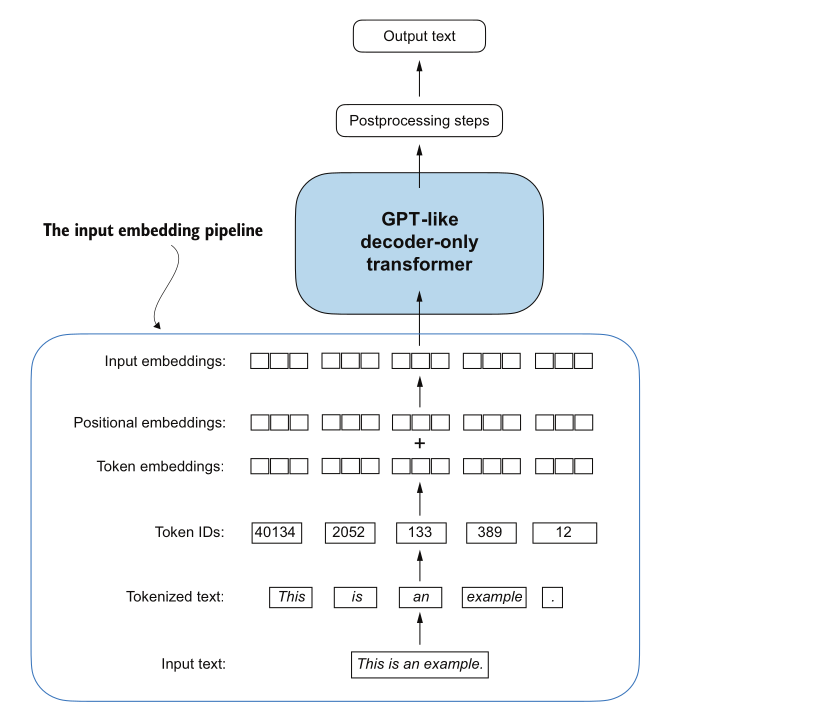
To pull it all together: input text is first converted into tokens, then each distinct token is mapped to its token ID. The token IDs are used to create token embeddings, and those, added to positional embeddings, give us the input embeddings. That last tensor is what actually enters the model.
We covered a lot of small mechanical steps here, but each one removes a little more of the gap between a string of text and the numbers a transformer can train on. In the next blog we get to the part that makes transformers special, the attention mechanism that we only touched on in the first post.